Last updated: October 13, 2026
Key Takeaways
- Small directories can use a simple slug; larger ones need a more structured URL scheme from the start.
- Build SaaS slugs from the stable product name: lowercase, numbers, hyphens, and no extra punctuation.
- Make URLs readable for people, but avoid keyword stuffing that makes them look automated.
- Edge cases need fallback rules because the standard slug pattern will not cover every product.
If you need to build SaaS directory listing URLs, the safe answer is: make them human-readable, stable, lowercase, and unique, then decide early whether the slug comes from the product name, the category, or both. That choice affects SEO, redirects, duplicate pages, and how easy it is to scale the directory later. This article uses the topic How to create SaaS directory listing URLs and slug rules throughout, because the naming, slug, and path decisions all belong to the same system.
I’m focusing on the practical problem: how to design URLs and slug rules that still work when product names change, categories expand, or multiple vendors share similar names. This is not a branding exercise. It’s a structure decision.
What Actually Determines the Right URL Pattern
If your directory is small, a simple /product-name/ slug is fine; if you expect category pages, vendor pages, and filters, then the URL scheme needs more structure from day one. The key question is whether the URL should identify the SaaS product alone or also signal where the page sits in the directory.
A clean default is:
/saas/product-name//saas/category/product-name//directories/sales/crm/hubspot/
I would choose the shortest path that still avoids collisions. A directory with 50 tools can survive simple slugs. A directory with 5,000 tools usually cannot, because names collide, categories change, and pages get duplicated through filters.
Here’s the trade-off against the obvious alternative. If you use only a product slug, the URLs stay short and portable, but “Slack” and “slack-1” problems appear fast. If you pack every taxonomy term into the path, URLs get brittle and ugly, and a category rename can force redirects across an entire section.
| Situation | Best Path | Why Other Options Fail |
|---|---|---|
| Small directory, fewer than a few hundred pages | Flat slug such as /tool-name/ |
Category-heavy paths add maintenance without much benefit |
| Large directory with overlapping names | Nested path such as /category/tool-name/ |
Flat slugs create collisions and awkward suffixes |
| Multiple content types on one domain | Separate base paths like /software/ and /compare/ |
Mixing types in one path makes canonicalization messy |
| Frequent category edits | Product-only slug plus category in navigation, not the URL | Category in the URL creates redirect churn |
The first rule I’d use is this: if the slug has to change often, it probably should not carry taxonomy. Quick check: if you already know category names will move around, keep the URL focused on the product identity, not the folder structure.
How Do I Build SaaS Slugs That Won’t Break Later?
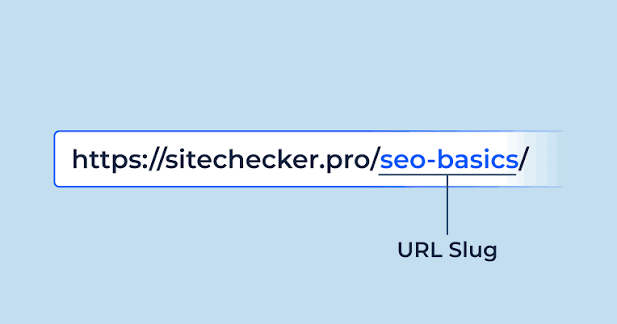
You build SaaS slugs by stripping the name down to its durable core: lowercase letters, numbers, and hyphens, with no brand fluff, no punctuation, and no changeable marketing copy. The slug should survive a logo refresh in 18 months.
A good slug rule set usually looks like this:
- Convert all text to lowercase.
- Replace spaces with single hyphens.
- Remove apostrophes, commas, ampersands, and trademark marks.
- Collapse repeated hyphens.
- Keep only ASCII characters unless your stack clearly supports Unicode slugs end to end.
- Trim stopwords only when they create noise, not by default.
- Reserve suffixes for collision handling, not for style.
For example:
- “Acme CRM” →
acme-crm - “Writer’s Room AI” →
writers-room-ai - “GitHub for Sales” →
github-for-salesif it is the official product name, not if it is just a comparison phrase
I would not use clever abbreviations unless the market already uses them. Abbreviations look tidy until a reader searches the directory from memory and cannot guess the URL. That hurts direct navigation and internal linking.
The biggest mistake is building slugs from page copy instead of the canonical product name. If you let a title tag generate the slug, then a headline test can accidentally rewrite the URL. That is expensive. URLs should change rarely, usually only after a permanent rename.
Use the 301 redirect standard whenever a slug changes. Google’s URL structure guidance is clear that stable, crawlable paths matter, and redirects are the right tool for permanent changes. For broader URL and crawl practices, I’d also keep an eye on Google Search Central’s documentation and the Unicode Consortium if you plan to support non-ASCII names.
Quick check: if a product changes its marketing tagline, your slug should still stay valid.
When Should the URL Include the Category?
If category pages are a core part of discovery, then category can belong in the path; if users mostly search by product name, keep the category out of the slug and put it in filters, breadcrumbs, and metadata instead. This is the point where a lot of generic advice gets it wrong.
Use category in the URL when:
- users browse by type more than by brand,
- your directory has distinct sections that need separate crawl signals,
- you want a hierarchy that makes sense in breadcrumbs and archives,
- or you need a clean parent-child model for related pages.
Do not bake category into the URL when:
- categories change every quarter,
- one product sits in several categories,
- you rely heavily on filters like price, deployment model, or team size,
- or the same tool can appear under “CRM,” “Sales,” and “Pipeline Management.”
A path like /crm/hubspot/ works only if “CRM” is truly the stable home for that page. If the same page has to live under /sales/ too, you need canonical tags and one primary URL, or you will create duplicate indexable pages.
That is the honest trade-off: category URLs help orientation, but they make restructuring painful. Product-only URLs are easier to maintain, but they push more work into site navigation and taxonomy pages.
For technical consistency, I’d keep these path rules aligned with RFC 3986 for URL syntax and with your CMS’s permalink system. WordPress, Contentful, Strapi, and Webflow all handle slugs differently, and the CMS often decides what you can cleanly enforce without custom code.
Quick check: if you expect the same tool to appear in more than one category, do not put every category in the URL.
If You Need Search-Friendly SaaS Directory URLs, Do This
If organic search matters, then the URL should be descriptive enough for a human, but not stuffed with keywords that make the path look automated. The right target is clarity, not keyword repetition.
I’d use this sequence:
- Pick one canonical page type for each product: profile, comparison, or category hub.
- Freeze the primary path before writing large amounts of content.
- Generate slugs from the official product name, not the article headline.
- Normalize casing, punctuation, and spacing across the entire directory.
- Set one canonical URL for every page and 301 all variants to it.
- Block or noindex filter combinations that can create thin duplicate pages.
- Test internal links, sitemap entries, and breadcrumbs against the canonical path.
If you run faceted search, the URL question gets harder. A filter like ?price=free&team=1-10 should usually stay out of the index unless it creates a real landing page with unique value. Otherwise, you end up with thousands of low-value combinations. That is a crawl budget problem, not a branding win.
A clean pattern is:
- indexable:
/category/project-management/ - non-indexable filter variant:
/category/project-management?pricing=free
The rule of thumb is simple: if the page can stand alone with its own copy, links, and intent, it can have a canonical URL. If it is just a sort order or filter state, it should not compete with the main page.
For external guidance, Google’s documentation on canonicalization and crawl control is the place I’d trust first, and the W3C’s URL standard is the technical backstop if your engineering team wants the formal syntax rules.
Quick check: if a filter page has no unique copy and no unique purpose, it should not get a permanent indexable URL.
The Edge Cases That Break Normal URL Advice
If your directory includes edge cases, then the standard slug rule is not enough and you need exception handling. These cases are where polished URL systems usually fail.
-
Duplicate product names
- Situation: two vendors share the same name.
- What changes: a flat slug collides.
- What to do instead: add a stable disambiguator, such as the company name or category, for example
/billing/zenpay/vs./payments/zenpay-inc/.
-
Official name changes
- Situation: the SaaS renames itself after acquisition.
- What changes: the old slug still has backlinks and search equity.
- What to do instead: keep the old URL live with a 301 redirect to the new canonical path, and preserve the old slug in a redirect map.
-
Non-English or accented names
- Situation: the product uses accents, diacritics, or non-Latin script.
- What changes: transliteration can create ambiguity.
- What to do instead: choose one transliteration standard and apply it consistently, or store a Unicode slug only if your full stack handles it cleanly.
-
Multi-brand products under one vendor
- Situation: one company sells several tools that share a root brand.
- What changes: slugs become too similar.
- What to do instead: include the product line in the slug, not just the parent brand.
-
Comparison pages that target two tools
- Situation: you need a
/compare/tool-a-vs-tool-b/page. - What changes: order matters and duplication is easy.
- What to do instead: pick one canonical order, usually alphabetical, and redirect the reversed version to it.
- Situation: you need a
-
Temporary campaign pages
- Situation: the page exists for 30 to 90 days.
- What changes: permanence is the wrong goal.
- What to do instead: keep the slug short, avoid embedding dates unless the page is truly time-bound, and retire it cleanly after the campaign ends.
Quick check: if a page name can change, collide, or be mirrored in another form, your slug rule needs a fallback, not a perfect one-size-fits-all rule.
What I Would Standardize Before Publishing the First 100 Pages
If you are past the prototype stage, then the best move is to write a slug policy before page 100, not after page 1,000. That policy should cover format, collisions, redirects, and what happens when taxonomy changes.
I would standardize these pieces:
- one canonical base path per page type
- lowercase slugs only
- hyphen separators only
- no dates in evergreen product pages
- one redirect target for every old slug
- one canonical tag per page
- one sitemap entry per indexable URL
- one owner for exceptions
The reason is practical. Once pages start accumulating backlinks, changing rules later creates redirect chains, lost internal link equity, and messy analytics. A directory that launches with product-name on Monday and switches to category/product-name on Friday has already created work for itself.
The hardest part is not generating slugs. It is deciding what happens when the business wants a prettier name, a broader taxonomy, or a new content type six months later. If the rules are written down, those changes stay controlled. If they are not, every edit turns into a URL argument.
I would not over-engineer this for a tiny directory. A 20-page site does not need a multi-layer URL schema with exceptions for every corner case. But once the directory becomes a discovery product instead of a simple content list, URL discipline stops being cosmetic and starts being structural.
Quick check: if three different people could invent three different URLs for the same page, your rules are not ready.
FAQ
Should every SaaS page have a unique slug?
Yes, every indexable page should have one canonical URL, even if multiple old versions redirect to it.
Are hyphens better than underscores in slugs?
Yes, hyphens are the standard choice for readability in web URLs, and underscores usually make paths harder to scan.
Should I put “best,” “top,” or “reviews” in the slug?
Only if that word describes the page type permanently; otherwise, keep it out and let the title tag do the marketing work.
What happens if I change a slug after launch?
Use a 301 redirect from the old URL to the new one, update internal links, and keep the canonical tag on the destination page.
Do I need category words in every SaaS URL?
No. Put category in the URL only when it solves a real navigation or duplicate-content problem; otherwise, use breadcrumbs, filters, and metadata.
Drafted with AI; not yet reviewed by a person.