Last updated: October 13, 2026
Key Takeaways
- Export both records, choose one canonical record, reconcile fields by hand, and merge in the source system.
- If you’re managing SaaS marketplace or directory listings, verify ownership before merging, not just title similarity.
- If regulated data, multiple subsidiaries, or automations are involved, standard merge advice changes quickly.
- If the merge goes wrong, restore the backup first and repair downstream systems one by one.
One wrong merge can ripple through billing, support, and reporting in a hurry. Back up the data, map the same account across tools, and pick the system of record before you touch the merge button. In 2024, SaaS teams still break billing, activity history, or customer records when they merge too early. Leave duplicates alone, and the mess shows up elsewhere: reports, routing, and renewals get noisy fast.
What actually causes duplicate SaaS listings?
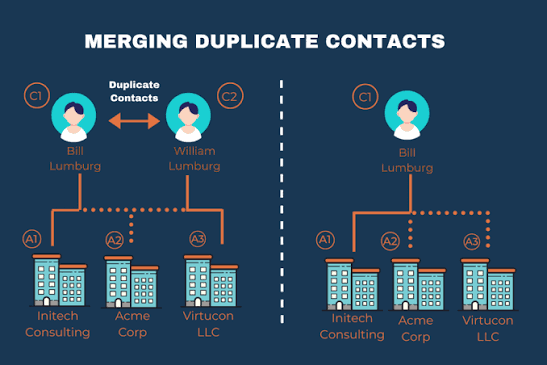
Duplicate SaaS listings usually start with multiple people creating the same company or app record in different systems, then syncing those records through a CRM, billing tool, support desk, or marketplace. Two rows for the same customer, app, or vendor often point to one root issue: two workflows never agreed on a single ID. Nasty little chain reaction.
Loose matching rules are the usual culprit. A Salesforce account might match on company name, while Zendesk matches on email domain and Stripe stores the billing contact as the primary identity; add a spreadsheet import, and you can get a third version in under 10 minutes.
For operations, the first question is not “what’s duplicated?” but “which object matters most?” I would start with the customer account, subscription, app listing, or tenant, because that choice decides what gets merged and what has to stay apart. In B2B SaaS, for example, two subsidiaries can share a parent company name yet still need separate invoices and access controls. Merging them because the names look alike is a mistake.
Use a simple rule before touching anything: if two records share a domain but not a legal entity, a billing instrument, or a tenant ID, treat them as candidates for review, not automatic merge. That sounds cautious because it is. A wrong merge is harder to unwind than a duplicate is to clean up. If the record affects money, access, or legal ownership, consult a professional and check the platform’s merge guidance first. For example, Salesforce duplicate rules and HubSpot merge records document different behaviors, and the U.S. Small Business Administration’s entity guidance can help you separate companies and subsidiaries.
Quick check: if the duplicates came from imports, syncs, or manual entry across more than one system, you need a matching policy before you need a merge button.
How do I decide whether to merge, link, or keep them separate?
Merge only when the records describe the exact same real-world object. Link them when they are related but still distinct. Keep them separate when legal, billing, or security boundaries differ. That decision prevents the most damage, though it is still a judgment call. When the boundary is fuzzy, consult a professional and check the vendor docs before you act.
Here is the shortest useful test I know: if combining the records would change access, billing, or audit history in a way you cannot defend later, do not merge yet. If it only removes duplication without changing those three things, merge is usually safe.
| Situation | Best Path | Why Other Options Fail |
|---|---|---|
| Same company, same tenant, same subscription, two CRM records | Merge | Linking leaves duplicate routing and reporting problems |
| Parent company and subsidiary with separate invoices | Keep separate, link hierarchically | Merging destroys legal and billing clarity |
| Same customer in Salesforce and Zendesk | Match/link across systems | A hard merge in one tool can orphan references in the other |
| Duplicate app listing from the same vendor | Merge listing records after backup | Keeping both confuses search, reviews, and ownership |
| Two accounts with same name but different domains or payment methods | Investigate manually | Auto-merge risks collapsing distinct customers |
For CRM or support desk work, I would avoid automatic merge rules that fire on email domain alone. Shared domains like gmail.com or a large enterprise domain can create false positives. If you’re managing marketplace listings or SaaS directories, the safer route is to dedupe first and merge only after you confirm ownership by admin email, billing trail, or verified domain.
A practical way to decide is to assign three labels: merge now, review later, separate forever. “Review later” matters because a lot of duplicate records are really unresolved identity conflicts, not obvious duplicates. That middle bucket keeps you from forcing a bad cleanup on day one.
Quick check: if you cannot explain in one sentence why the two records are the same object, do not merge them yet.
What is the safest way to merge listing records?
Export both records, pick one canonical record, reconcile the fields by hand, and only then merge inside the source system. Skip the export, and you are trusting the merge tool to preserve everything you care about — a gamble, frankly, that often goes sideways.
Here is the path I would use for a high-value SaaS listing or account record:
- Identify every system that references the duplicate record: CRM, billing, help desk, product analytics, and any marketplace or directory.
- Export both records in full, including IDs, notes, tags, custom fields, activity history, and timestamps. Keep the export in CSV or JSON so you can compare it later.
- Choose the canonical record based on completeness, not age. The record with the cleanest ID trail and the fewest missing fields usually wins.
- Map field-by-field ownership: billing data from Stripe or your invoicing system, support history from Zendesk or Intercom, sales notes from Salesforce or HubSpot, and usage data from the product database.
- Check whether the platform offers merge rules or conflict resolution. Some tools preserve the newer value; others preserve the original. That difference matters more than the merge button itself.
- Run the merge in a test or staging environment if the platform allows it, especially for systems connected by webhook or API.
- After the merge, verify 5 things: login access, invoice history, open tickets, ownership fields, and automation triggers.
The hard part is not the merge. It is deciding what to do with conflicting fields. I would keep the most authoritative source for each field type. Billing address comes from the billing system, not the CRM. Product plan comes from the subscription source of truth, not a note in support.
Salesforce duplicate rules, HubSpot merge records, Zendesk organizations, Intercom contacts, and Stripe customer records all handle this differently. They make different choices about which data survives, so read the platform’s merge documentation before you click anything. For standards-minded teams, a lightweight data dictionary is enough to reduce mistakes.
A merge that takes 20 minutes to plan can save 20 hours of cleanup. Done without backup, it can cost you a week of support tickets.
Quick check: if the record touches billing, support, or access control, export first and merge second.
If you’re managing SaaS marketplace or directory listings, here’s what to do
Verify ownership first, then merge. That matters more than title similarity. Two listings can look alike and still belong to different products, different vendors, or different resellers.
The common trap is assuming the problem is only duplicated text. In practice, the real issue is duplicated identity. One listing may be the vendor-managed profile, another may be a partner-created listing, and a third may be a stale import from an older catalog. Merge the wrong pair, and you can lose review history or point traffic to the wrong login page.
Use this path:
- Verify the owner of each listing with the vendor admin account, verified domain, or marketplace admin console.
- Check whether the listing has unique identifiers such as SKU, app ID, tenant ID, or marketplace product ID.
- Compare metadata side by side: pricing page URL, support email, product logo, category, and last update date.
- Decide whether one listing is canonical and the others are duplicates, or whether they represent separate editions, regions, or plans.
- Preserve any review or rating history if the platform allows it; if not, export it before merging.
- Update redirects, canonical URLs, and cross-links so the surviving record keeps traffic and search equity.
For directories and marketplaces, I would not merge unless I can prove that the same team controls both listings. “Looks the same” is not enough. If the listing affects search visibility, one bad merge can bend organic traffic and make support routing harder for months.
Strict verification slows cleanup; that is the trade-off. But it protects ownership and search trust. Fast cleanup feels good and often creates a mess that shows up again in the next import cycle.
Quick check: if you cannot verify the same owner or product ID, stop at review and do not merge.
The 3 conditions that change everything
If any one of these conditions is true, the standard merge advice changes fast: regulated data, multiple subsidiaries, or active automations tied to record IDs.
First, regulated data changes the risk. If a duplicate record contains personal data, payment details, or anything that falls under retention rules, you need to think about deletion, correction, and auditability, not just tidiness. GDPR and similar rules can make record history sensitive, so keep the audit trail intact and involve the right internal owner. I would treat this as a compliance task, not a housekeeping task. If the record is regulated, consult legal or compliance staff and review the GDPR text and your vendor’s retention policy.
Second, multiple subsidiaries or regions change the meaning of “duplicate.” A global SaaS customer can have one parent relationship and several local contracts. Merging those into one record can wreck tax, invoicing, and regional reporting. In that case, use a parent-child structure instead of a flat merge.
Third, active automations change the blast radius. If the duplicate record is feeding a Zapier workflow, webhook, or CRM automation, the merge can fire updates, change ownership, or trigger email sequences. Before merging, pause automations or test in a sandbox. A 5-minute pause can save an hour of false alerts.
I would also add a fourth condition: high-velocity sales pipelines. If the account is in the middle of a renewal or trial conversion, do not merge casually. Wait until the deal closes or the ownership dispute clears. Sales teams hate data cleanup, but they hate lost credit more.
Quick check: if the record affects compliance, subsidiaries, or automations, merge only with a rollback plan.
What should I do when the merge goes wrong?
Restore the backup first, then repair the downstream systems one by one. Do not start by “fixing the visible record,” because the visible record is usually not the only thing that broke.
Use this recovery path:
- Freeze the affected automation or integration so the problem does not spread.
- Identify the exact moment of the merge and note the source record IDs, timestamps, and users involved.
- Restore the exported backup or use the platform’s undo if it exists and is trustworthy.
- Reconcile dependent systems: CRM ownership, support tickets, billing customers, product permissions, and reporting dashboards.
- Check for duplicate side effects such as double emails, reassigned tasks, or lost tags.
- Document the root cause and add a prevention rule, such as stricter matching or required review for future merges.
If the platform has no clean rollback, you may need to recreate the losing record and reattach references manually. That is why exports matter so much. A recovery path without a backup is a wish, not a plan.
The honest limitation here is that some systems preserve only part of the history after a merge. Support notes might survive while event timestamps do not. Activity feeds, IDs, and external references often behave differently. Before you merge anything valuable, check the platform’s merge documentation and support policy, or ask the vendor support team how reversals work. If the answer is vague, treat the merge as irreversible until proven otherwise.
Quick check: if you do not know how to undo the merge in your platform, you are not ready to perform it.
Edge cases where the normal advice breaks down
If you hit one of these cases, the usual “merge duplicates” advice is not enough.
-
Situation: one record is a parent account and the other is a child account.
What changes: the relationship matters more than the duplication.
What to do instead: keep both and build a hierarchy, because merging can destroy regional reporting and contract separation. -
Situation: the duplicate appears only after a CSV import.
What changes: the import mapping is probably the real problem.
What to do instead: fix the field mapping and dedupe rules before you merge anything else, or the duplicates will return next week. -
Situation: two records share an email domain but belong to different teams.
What changes: the domain is not a safe unique key.
What to do instead: verify by admin access, billing trail, or tenant ID, not by domain alone. -
Situation: the listing has reviews, ratings, or marketplace rank.
What changes: merge decisions affect visibility and social proof.
What to do instead: preserve canonical URLs and export review history before consolidation. -
Situation: one record is stale but still powers an active integration.
What changes: old records can still be live in Zapier, Make, or a direct API connection.
What to do instead: inventory integrations first, then merge after you update or pause them. -
Situation: the duplicate involves a rebrand or product rename.
What changes: the records may be different names for the same product across time.
What to do instead: merge only after you confirm the product lineage and keep redirects or alias fields intact.
These are the cases where I would slow down most. They look like cleanup jobs and behave like data-model decisions.
Quick check: if the duplication involves hierarchy, integrations, or ratings, treat it as a special case, not a routine merge.
A practical checklist for the first cleanup pass
Start with inventory, then classify, back up, merge, and verify. That sequence works better than trying to be clever on the first pass.
- List every duplicate record and the system where it lives.
- Tag each one as merge, link, or separate.
- Export both records before touching anything.
- Choose the canonical record by completeness and authority of fields.
- Merge one pair at a time, not in bulk.
- Verify logins, invoices, tickets, and automations after each merge.
- Keep the backup until the next reporting cycle is clean.
Two tools help here: a spreadsheet for the inventory and a change log for the merge decisions. If the team is larger than two people, assign one owner for approval and one owner for verification. That alone can cut rework.
Quick check: if the cleanup is large, run a pilot on one low-risk duplicate before you touch the rest.
Drafted with AI; not yet reviewed by a person.