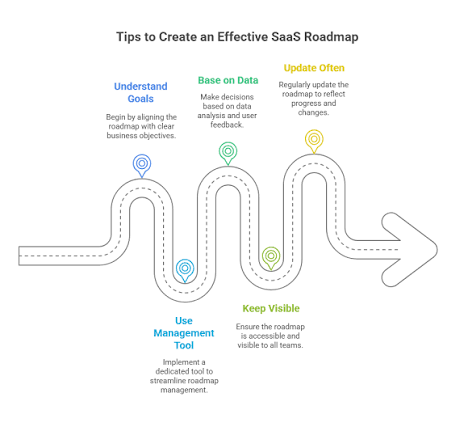
Last updated: October 12, 2026
Key Takeaways
- Pick the listing channel based on buyer intent, not vanity traffic.
- Write one profile that names the job, audience, integrations, and pricing model.
- Use 3 to 5 high-fit directories first; more than that usually creates upkeep debt.
- Marketplace listings suit products that live inside another ecosystem; review sites suit comparison shoppers; niche directories suit specific use cases.
What should a SaaS listing do first?
Quick Answer: a SaaS listing should make the next step obvious in under 2 minutes, with a profile that helps the buyer decide whether to start a trial, request a demo, or compare alternatives. A SaaS listing should send the right buyer to the next step, not just collect impressions. That means the listing has one job: help someone decide whether to start a trial, request a demo, or compare you against alternatives in under 2 minutes.
I start with the outcome because everything else depends on it. A directory profile for lead gen needs different copy than a profile built for backlinks, app installs, or review collection. If you do not choose the main job first, you end up writing a page that tries to do all four and does none well.
The practical question is what kind of buyer you want. If the user is already in a software marketplace, the listing should move fast and remove setup friction. If the user is comparing vendors, the listing should answer fit questions: category, team size, integrations, implementation effort, and pricing model. If the user is discovering a new category, the listing should explain the problem in plain language before it tries to sell.
A useful rule is to list where the buyer already has intent. A product used inside another platform belongs in that platform’s marketplace first. A stand-alone product usually belongs on comparison sites and niche directories before generic startup boards. A broad launch page can still help, but it rarely carries the same purchase intent as a place where buyers are already searching for software.
The trade-off is clear. Broader visibility can bring more clicks, but the traffic is often colder. Narrower placement can reduce volume, but it usually improves the lead quality. I would rather have 200 relevant visits than 2,000 curious ones that never convert.
How do I choose which SaaS directories are worth my time?
The directories worth your time are the ones that match your buyer, your category, and your upkeep capacity. If one of those three is missing, I would usually skip the directory and put the effort into a better channel.
Use a simple filter before you submit anything:
- Buyer fit: does the audience include the job titles or use cases you sell to?
- Category fit: does your product belong here naturally, or does it look forced?
- Maintenance burden: can you keep screenshots, pricing language, integrations, and descriptions current?
- Conversion path: can the listing send people to a trial, demo, or install without dead ends?
- Review value: can customers leave credible feedback on the page?
Buyer fit is the first test because directory traffic means little if it comes from the wrong person. A payroll tool for mid-market finance teams does not need a broad launch page as much as it needs a place where finance buyers compare payroll software. A CRM add-on may do better in a marketplace where users are already building their stack than in a generic software list.
Category fit matters because the listing has to feel native. If your tool is for customer support, a support software directory is stronger than a general “best apps” page. That is not about status; it is about relevance. The tighter the match, the easier it is for the buyer to understand why your product belongs in the shortlist.
Maintenance burden is easy to ignore at the start. It becomes obvious later when you have six listings and every one of them needs a different feature order, screenshot size, or plan description. A directory that saves time on submission but costs hours every month is usually a bad trade.
Review value deserves separate attention. BrightLocal’s 2024 research on consumer review behavior is often cited because it shows how heavily people rely on reviews when they evaluate businesses, and the same habit carries into SaaS shopping. For software, reviews matter less as a vanity metric and more as a decision shortcut.
I would rank opportunities this way if time is limited: app marketplaces first, review platforms second, niche directories third, broad startup directories last. That order changes only when your product has no marketplace presence at all.
How do I list my SaaS product step by step?
You list your SaaS product step by step by choosing the right channel, writing one tight profile, and publishing it in a sequence that matches how buyers actually evaluate software. The process is straightforward, but the details matter.
-
Define the primary use case in one sentence.
Write the product’s job in plain English, such as “invoice approval for small finance teams” or “customer support for Shopify stores.” This sentence becomes the filter for every directory choice and the first line of the profile. -
Choose 3 to 5 directories.
Pick one marketplace if your product integrates into another ecosystem, one or two review sites if buyers compare you with competitors, and one or two niche directories if the audience is specific. More than 5 usually creates more maintenance than value. -
Collect the exact assets each directory asks for.
Most platforms want a logo, 3 to 6 screenshots, a short description, a long description, a URL, and a pricing model. Gather those before you submit so you do not pause halfway through and forget what you wrote on the first site. -
Write one master description, then adapt it.
Start with the category, then the audience, then the result. A strong format is: what it is, who it is for, what problem it solves, and what tools it connects to. Keep the core message the same across all listings, but adjust the emphasis for each site. -
State pricing as a model, not a stale figure.
Use “free trial,” “free plan,” “per-seat,” “usage-based,” or “quote-based” unless you can keep exact numbers current. Software pricing changes too often for old amounts to stay useful. Buyers need the structure more than an outdated total. -
Add integrations that actually matter.
Name the systems the buyer already uses, such as Slack, HubSpot, Google Workspace, Stripe, Salesforce, or Zapier. Ten shallow integrations are less convincing than 3 that clearly fit the workflow. -
Publish, then check the profile as a buyer would.
Open the listing in a private browser window and look for obvious friction: vague copy, mismatched screenshots, buried CTA, or missing pricing language. Fix the issues before you assume the page is working. -
Track the result for 30 days.
Measure signups, demo requests, installs, or review volume over a full month, not a weekend. A 30-day window gives the listing enough time to collect real traffic patterns instead of launch noise.
The most common mistake in this process is skipping step 1. Once the use case is fuzzy, every listing becomes a compromise. The result is a profile that attracts visitors but fails to help the right ones decide.
Which listing type should I use: marketplace, review site, or startup directory?
You should use the listing type that matches how your buyer wants to evaluate software. Marketplace listings fit products that are installed or connected inside another platform, review sites fit comparison shoppers, and startup directories fit launch visibility.
Marketplace listings work best when the buyer is already in setup mode. Think browser extensions, plugins, payment tools, CRM add-ons, ticketing integrations, and workflow apps. The advantage is friction reduction: the buyer is already inside the environment where the product lives. The downside is dependence on the host platform’s rules, ranking logic, and approval process.
Review sites work best when the buyer is comparing vendors side by side. That makes sense for categories like help desk software, email marketing, scheduling, project management, and analytics. The advantage is clear comparison intent. The downside is competition; you are now listed next to tools with more reviews, more screenshots, and more historical activity.
Startup directories work best when the goal is awareness or launch momentum. They are useful for telling the market that the product exists, especially in the first 30 to 90 days after launch. The weakness is that launch traffic is often brief and broad. It can help with discovery, but it rarely stays the strongest source of qualified leads.
My rule is simple. If the product plugs into a major ecosystem, start with the marketplace. If the product is a stand-alone SaaS tool with known competitors, start with review sites. If the product is new, unusual, or category-light, add startup directories for explanation and visibility.
What should go into the listing?
The listing should give a buyer five things fast: what the product does, who it is for, how it connects to existing tools, how it is priced, and why it is different from the obvious alternative. That is the minimum that keeps a profile useful.
I would build the content in this order:
- Headline: name the category and audience.
- Short summary: explain the main job in one sentence.
- Core benefits: list 3 to 6 outcomes, not 20 features.
- Integrations: name the systems that matter to the workflow.
- Pricing model: state the structure clearly.
- Screenshots or demo video: show the actual interface.
- Social proof: include reviews, logos, or case studies only if they are current and real.
- Call to action: direct the visitor to trial, demo, install, or pricing.
A listing does not need to sound impressive; it needs to sound precise. “Project management for agencies with client approval workflows” tells a buyer far more than “AI-powered productivity platform.” Precision wins because it makes the product easier to place in a mental category.
The biggest content mistake I see is feature dumping. A directory page is not the place to recite every capability from your site. Three to 6 features are enough for most listings because buyers scan for fit, not for a full product manual.
I also think it helps to state what the product is not. That sounds negative, but it saves time for the wrong buyer and reduces support noise later. If the product is designed for SMBs and does not include enterprise SSO, say so in a soft but clear way. If the tool requires a specific ecosystem, name it.
Use screenshots with purpose. Show the setup screen, workflow step, dashboard, or report—the point where the buyer can imagine doing the job. Decorative images add polish but rarely help decisions.
How should I write the listing so people actually click?
The listing should start with the problem, not the technology. That is often the fastest way to earn attention from a buyer who is scanning ten tabs at once.
Use this sequence:
- Problem first: name the pain point.
- Audience second: say who the product serves.
- Outcome third: explain what changes after setup.
- Proof fourth: mention an integration, workflow, or capability.
- CTA last: point to the next step.
A strong opening usually sounds specific enough to exclude the wrong reader. “Invoice automation for freelance accountants” is better than “all-in-one finance software.” “SOC 2 evidence collection for small security teams” is better than “modern compliance platform.” Narrow language is not a weakness here; it is a filter.
One reason listings underperform is vague comparison copy. If you are replacing a well-known alternative, say how your product differs in one sentence. It may be faster to set up, better for a smaller team, or simpler to maintain. I would not try to win on every dimension at once.
Integrations deserve careful wording. A logo row without context is weak. “Connects to Slack for alerts” is stronger than a wall of partner icons. The same is true for setup claims. If onboarding takes 30 minutes, say it only if that number is current and defensible. If the product requires a Salesforce workspace or a Stripe account, say that plainly.
The best click-through copy often answers one objection before the buyer has to ask it, though that depends on the category and the reader. Pricing model, platform requirement, and target team size are all fair to mention early. That shortens the decision path.
What should I avoid when I list a SaaS product?
I would avoid any listing that cannot send relevant traffic, cannot be maintained, or cannot explain the category clearly. Those are the three failure modes that waste time without building distribution.
The most common mistakes are predictable:
- Submitting everywhere at once. That creates inconsistent descriptions and stale profiles.
- Using the same pitch on every site. A launch board, a review site, and a marketplace do not serve the same reader.
- Leaving old screenshots in place. A mismatched interface makes the profile look abandoned.
- Hiding the pricing model. Buyers often treat missing pricing as friction, not mystery; if pricing is material to the decision, consider consulting a sales or legal professional before publishing anything ambiguous.
- Ignoring reviews on review platforms. Unanswered negatives can make the profile feel neglected.
- Picking directories with vague categories. If the site cannot classify your product well, the visitor usually cannot either.
The cost of these mistakes is not just lower traffic. It is lower trust. A messy listing teaches the buyer that the product, the company, or both may be equally sloppy. That is hard to recover from.
There is also a temptation to chase volume with broad submission lists. That can look productive in a spreadsheet, but it often creates 20 low-quality profiles instead of 4 useful ones. I would rather have fewer listings that stay accurate than many that rot.
One exception is a new category with no clear keyword. In that case, broad discovery pages can help the market learn the label. Then the listing is doing education as much as conversion, which is a different job and a different standard.
What changes the decision entirely?
The decision changes entirely when the product is ecosystem-first, sales-led, or category-creating. Those products need a different listing sequence than a standard stand-alone SaaS tool.
Here are the situations that change the plan:
-
The product lives inside a dominant platform.
Start with the marketplace because that is where the user already works. -
The product has a long enterprise sales cycle.
Prioritize review credibility and clear profile language over launch buzz. -
The product creates a new category.
Use startup directories and niche sites to explain the problem before you try to scale traffic. -
The product has compliance or security constraints.
The listing should mention standards, approvals, or data-handling expectations early, or the wrong buyers will fill the pipeline. -
The product’s value depends on one integration.
Make that integration the center of the profile, not a side note.
This is where “list it everywhere” breaks down. Channel choice is not about maximizing the number of pages published. It is about matching the listing type to the way the product is bought. A marketplace is not a review site. A review site is not a launch page. They reward different kinds of intent.
If I had one hour to spend on this task, I would spend 15 minutes defining the use case, 20 minutes choosing the best 3 directories, 15 minutes drafting the core profile, and 10 minutes checking the first listing for missing pricing, unclear integrations, or weak screenshots.
The shortest useful version
The shortest useful version is this: decide what the listing is for, pick directories that match buyer intent, write one precise profile, and keep the page current for 30 days after publication.
Choose a marketplace first if the product lives inside another ecosystem. Choose review sites first if buyers compare alternatives. Choose niche directories first if the audience is narrow. Skip broad submission lists unless they genuinely fit the buyer you want.
The goal is not to be everywhere. The goal is to be in the few places where the right person is already looking.
Drafted with AI; not yet reviewed by a person.